The best first automation is often a modest handoff that people already understand. A request arrives, the right person receives it, and the next action is visible. The value comes from removing repeated coordination without losing track of responsibility.
Automating an unclear process can move confusion faster. If staff disagree about when a job is ready, a tool cannot reliably decide when to notify the customer. Begin by describing the work, including the exceptions that usually require a conversation.
Here is a practical way to choose and scope a first automation for a small business.
Follow one request from beginning to end
Take a recent ordinary task and list what actually happened. Identify the trigger, the information received, the decisions made and the system that held the final record. Ask the person who performs the work to check the list.
Consider a fictional bicycle repair shop. A customer requests a service through the website. A staff member checks the description, asks about missing details, proposes a visit and records the agreed appointment. An initial automation might create an intake record and notify the service desk. It need not diagnose the bicycle or promise a completion date.
Write the starting condition precisely: a valid new request was accepted by the website. Then define completion: a record exists with an owner, and the team can see whether the notification was delivered. “The form connects to our tools” is too vague to check.
Choose a task with stable rules
Look for work that repeats, uses a reasonably consistent input and has a clear definition of success. Copying an approved appointment into a shared work list may fit. Deciding whether an unusual repair should be accepted may still require a person.
Evaluate the task on four practical questions:
- Does the team agree on the current process?
- Can the action be described without frequent exceptions?
- Can a mistaken result be detected and corrected?
- Is the repeated effort significant enough to justify maintaining the connection?
You do not need a financial model with invented precision. Record the time spent on the current handoff, the frequency of corrections and the ordinary support effort. Compare those observations with the proposed cost of implementation and maintenance. An infrequent task may be better served by a clearer checklist.
Decide which system owns each fact
If the calendar owns appointment time, avoid making a separate spreadsheet the competing authority for it. If the repair system owns job status, let notifications follow an approved change there.
Two-way synchronization deserves particular care. A staff member changes the appointment in one tool while another person edits the other. Which change wins? How does the team notice a conflict? What happens to a cancellation that arrives after an older update?
For a first release, a deliberate one-way handoff can be easier to operate. State what the connection copies and what it does not. Staff should not discover the boundary only after making a change in the wrong place.
Design the exception path before the happy-path demo
List the foreseeable failures alongside the intended action. For the repair shop, that includes a missing contact address, a duplicate request, a temporarily unavailable calendar and a staff member who no longer receives notifications.
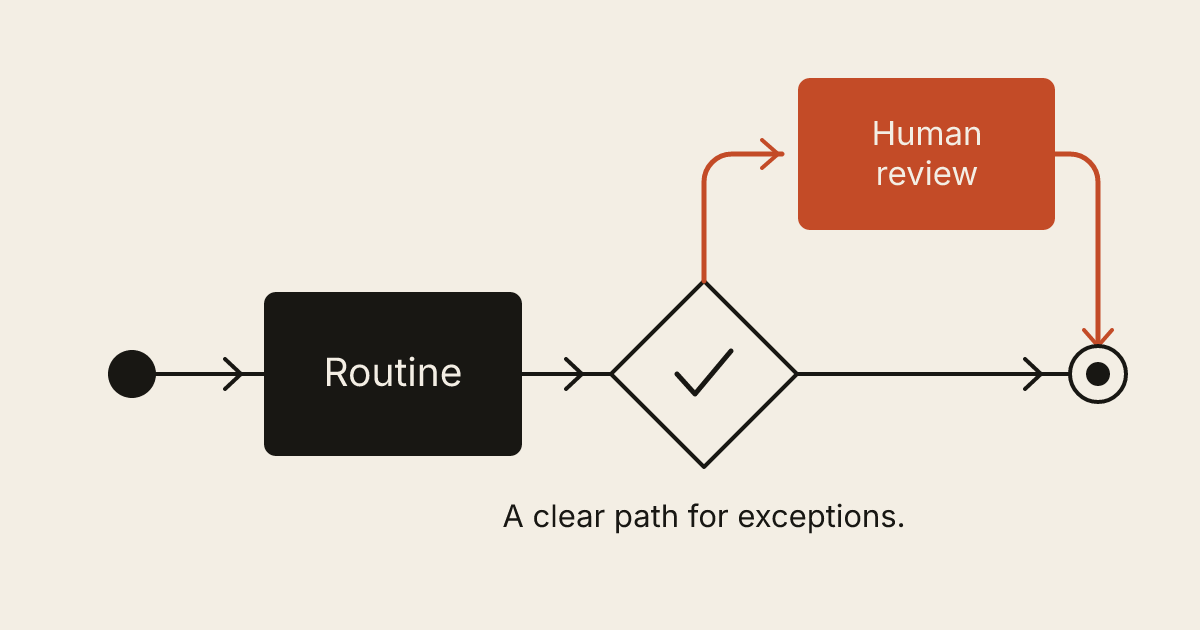
Every exception needs an outcome. Invalid input may return to the customer for correction. An unavailable service may wait and retry. An ambiguous match may go to a person. A permanent failure should appear somewhere the responsible team actually checks.
Distinguish a temporary delivery problem from a business rejection. Retrying a connection failure may be useful. Repeatedly resubmitting an appointment that has already been rejected by the shop's scheduling rules is not.
The operator also needs context. “Automation failed” does not say which customer or step needs attention. A useful failure record identifies the affected request, the completed steps, the remaining action and the latest understandable error. Keep sensitive information out of broadly shared alerts.
Plan for repeated and late messages
External systems can deliver the same event more than once. A retry should not create another appointment, send a second charge request or produce several copies of the same customer record.
Engineers call one part of this problem idempotency: making a repeated request have the intended single effect. The Amazon Builders' Library explanation of safe retries describes using a request identifier to distinguish a retry from a new intent. Ask how the proposed automation recognizes work it has already completed.
Arrival order matters too. Stripe's webhook documentation, for example, explicitly says event delivery order is not guaranteed. That is a concrete provider behavior to design around, not a reason to assume every integration behaves identically.
In the shop example, an older appointment confirmation should not quietly replace a newer cancellation. The implementation needs a way to check current state and handle the event appropriately. A screenshot of two tools connected together does not demonstrate that behavior.
Keep approval and recovery in the workflow
An automation can prepare work without committing the business to it. It may draft a reply, assemble an estimate from approved inputs or suggest a category while a person makes the final decision.
Place approval where it changes the outcome. A price exception or unusual customer request deserves a named decision-maker. Approving every routine copy operation can recreate the original workload, so separate predictable actions from actions with meaningful consequences.
The manual fallback should be usable during an outage. Staff need to know what was completed before the failure and how to finish the remaining work without duplicating it. Provide a way to pause the automation, inspect a request and resume safely. Assign someone responsibility for that procedure.
Test with a small, representative set
Begin in a test environment or with an explicitly controlled pilot. Include an ordinary request, a duplicate, incomplete input, an unavailable destination and a correction after the first submission. Verify the receiving system as well as the automation's own activity screen.
Check time zones, permissions and staff access where they matter. A scheduled message that appears correct in the builder's account may be wrong for the person using it. Record what happens when a connection token expires and who receives the warning.
After launch, review actual outcomes. Are requests reaching the right place? Are exceptions understandable? Has the automation reduced repetitive work, or has it merely moved it into another dashboard? Use those observations to decide the next improvement.
Write a brief that includes the difficult parts
A useful automation brief names the trigger, the system of record, the intended action, the owner and the recovery path. Include sample inputs that are safe to share and a few examples of requests that should stop for review.
If you have a repetitive handoff in mind, describe the current process in a brief. Start with one complete workflow. A small connection that the business can understand and recover is a sound foundation for broader automation.